When I first heard about Lapsula, I rolled my eyes. “Not another productivity app.” I’ve used Trello, Asana, Notion, ClickUp, Monday—you name it. They either try to do too much or not enough.
But I was curious, so I gave Lapsula a spin.
To my surprise? It’s actually good. Not just good—it’s one of the first tools I’ve used that genuinely made my workday easier, not harder. And if you’re anything like me—juggling multiple projects, managing a team, or freelancing—it might just be what you’ve been looking for too.
Let’s break it all down.
What is Lapsula? (And Who Is It Really For?)
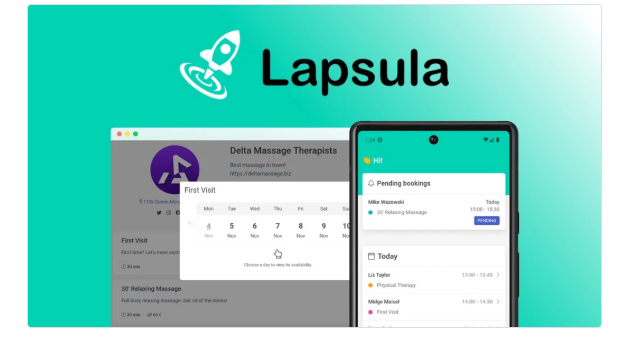
Lapsula is a web-based project management and collaboration platform. But honestly, calling it that feels a little too simple.
Because here’s the deal: Lapsula isn’t just for “managing tasks.” It’s for getting actual work done, whether you’re on your own or part of a team.
Here’s what I use it for:
- Creating and organizing projects (in boards, lists, or timelines)
- Assigning tasks to team members (or just myself)
- Tracking time spent on each task
- Chatting with team members without switching apps
- Sharing files in one place
- Automating small, annoying tasks
- Giving clients a window to view progress (without overwhelming them)
The best part? It does all that without feeling bloated or overwhelming.
First Impressions: Clean, Fast, Easy
Let’s talk UI. I don’t like tools that feel heavy or confusing, and I was relieved when I logged into Lapsula for the first time.
The interface is lightweight, fast, and easy to understand. Everything’s labeled clearly. No weird terminology. No guessing where things are. If you’ve used Trello or Notion before, you’ll feel right at home.
Within 20 minutes, I had:
- Created a new project
- Built out task boards for my client work
- Set deadlines
- Invited a teammate
- Started tracking time on my first task
That’s rare. Most tools make onboarding feel like a full-time job. Lapsula doesn’t.
What I Actually Liked (and Still Use Daily)
Here’s where Lapsula shines for me—and where it might shine for you too.
✅ 1. Built-In Time Tracking That Doesn’t Suck
I do a lot of hourly client work, and I’ve tried almost every time tracker out there. Lapsula’s built-in time tracking just works.
Click “Start” on a task. Click “Stop” when you’re done. Boom—your time is logged, and you can even tag it to a project or client. That’s it. No switching apps. No forgetting to track. No messy timesheets.
✅ 2. Task Boards That Fit Your Workflow
Some tools force you to work a certain way. Not Lapsula. You can switch between:
- Kanban (drag-and-drop boards)
- List view (for checklist people like me)
- Calendar (for visual deadline planners)
I bounce between all three depending on the project. It’s flexible without being overkill.
✅ 3. Chat That Lives Right Next to Your Work
This one is huge. I don’t have to Slack someone or email them to ask about a task. I just @mention them right inside the card or use the project chat. It keeps the conversation where it belongs—next to the actual work.
✅ 4. Client Collaboration That Doesn’t Feel Awkward
If you’ve ever tried giving a client access to your project dashboard, you know the pain. Too much info, confusing setup, or worse—they break something.
Lapsula lets you invite clients with read-only or limited access, so they can see progress without getting overwhelmed. You can even add your branding, which feels super pro.
Things I Didn’t Love (Because No Tool Is Perfect)
Alright—nothing’s perfect. And I wouldn’t be honest if I didn’t mention the quirks.
❌ No native mobile app (yet)
You can use Lapsula in your phone browser (it’s mobile-friendly), but there’s no native iOS or Android app. A proper app would be nice for checking updates on the go.
❌ Offline mode is limited
If your internet goes down, you’re out of luck. Lapsula is cloud-based, so there’s no real offline functionality yet. That may change, but for now, it’s best used online.
❌ Some integrations still missing
It has Slack, Google Drive, Dropbox, and Zapier—but no native Notion or Google Calendar integration yet. I’ve made do, but it’s something I hope they expand.
Pricing: Surprisingly Reasonable
I honestly expected this tool to be expensive because it replaces like 3 or 4 others I was paying for. But the pricing is very fair:
| Plan | Price | Best For |
|---|---|---|
| Free | $0 | Solo users just getting started |
| Starter | $9/user/month | Small teams, freelancers |
| Business | $19/user/month | Agencies, growing teams |
| Enterprise | Custom | Large orgs with security needs |
No hidden fees. No long-term contracts. You even get 20% off if you pay annually.
And yes—you can try it free without a credit card. That’s how I started.
Who Lapsula Is Best For (Real Talk)
Here’s my take. Lapsula is perfect if you are:
- A freelancer juggling clients and need time tracking + project boards
- A remote team that needs one hub to organize work and communicate
- A small agency looking to ditch 5 different apps
- A startup that wants to scale without burning money on expensive tools
If you’re a massive enterprise with complex IT needs, you might want something more corporate. But for most solo workers, creatives, and small teams, this tool is honestly a breath of fresh air.
My Final Thoughts: Should You Try Lapsula?
Here’s the short answer: Yes.
If you’ve been frustrated with juggling tools—or if you’re just starting out and want a clean, all-in-one solution—Lapsula is 100% worth checking out.
It won’t waste your time. It won’t drain your wallet. And it actually helps you get things done without all the noise.
I’ve been using it for a few months now, and I’ve already canceled 3 other tools. That alone speaks volumes.
Try It for Yourself (No Pressure)
Want to see what it’s like? Just head to Lapsula’s website and sign up for the free plan. No credit card. No weird setup. You’ll know in 15 minutes whether it clicks for you.
And if it does? Trust me—you’ll wonder why you didn’t find it sooner