If you’ve ever tried launching something online—an eBook, a mini-course, a coaching offer, even just a simple digital download—you already know how overwhelming it can be.
You need a landing page. An email list. A checkout system. Affiliate tracking. Something for payments. Something else for analytics. And if you’re not a tech person? Forget it. You’re stuck Googling how to connect 6 different tools just to sell one thing.
That’s why Kiwilaunch caught my attention.
I stumbled on it while looking for a better way to launch a small workshop I was planning. I didn’t want to mess with WordPress plugins or Zapier automations. I just wanted one clean, modern place where I could build a launch page, take payments, and email people.
And Kiwilaunch promised exactly that. After trying it out for a few weeks, here’s my honest review.
🥝 So, What Exactly Is Kiwilaunch?
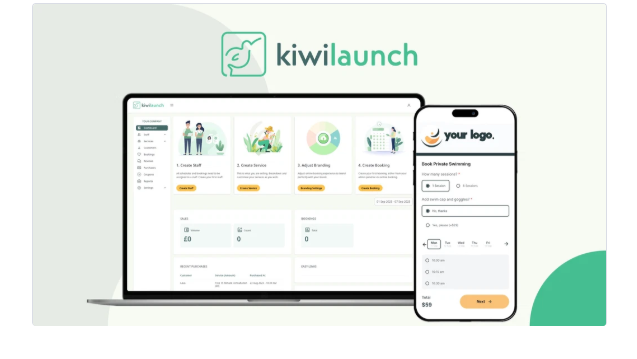
Kiwilaunch is an all-in-one platform designed specifically for creators, entrepreneurs, and solo business owners who want to launch and sell digital products without tech headaches.
Think of it like a simpler, more focused alternative to Kajabi or Podia. But lighter. Easier. Cleaner. No fluff.
It helps you go from idea → waitlist → landing page → sales → email follow-up… all in one platform. No coding, no duct-taping tools together.
✨ What I Liked Most (Features That Actually Helped)
Here’s what stood out for me—not just the “features,” but what actually mattered in real life:
- Waitlist pages are plug-and-play. I created a pre-launch waitlist in less than 10 minutes and started collecting signups without overthinking the design.
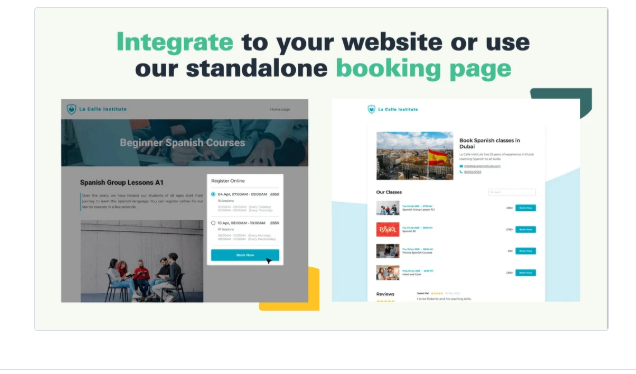
- The landing page builder is gorgeous. You know how some tools make you feel like you’re building a high school PowerPoint? Kiwilaunch gives you templates that actually look modern. I used one with bold colors, big headlines, and it converted well with zero tweaks.
- Email flows are included. No need to integrate ConvertKit or Mailchimp. I just set up a few automated emails (like “thanks for signing up” and “we’re launching tomorrow!”), and it worked flawlessly.
- Stripe checkout is built-in. Took about two clicks to connect my Stripe account. No weird webhook stuff.
- Real-time analytics. I could see exactly how many people viewed my page, signed up, and clicked through. No guessing.
- Affiliate option? YES. I didn’t use it on my first launch, but being able to invite people to promote my product and earn a commission is a huge plus.
😎 Who Is This Really For?
If you’re someone who…
- Has an idea for a digital product
- Is tired of complicated platforms
- Wants to launch without hiring a tech person
- Needs something affordable and focused
- Likes clean design and intuitive tools
…then you’ll probably love Kiwilaunch.
It’s great for creators, writers, solopreneurs, consultants, coaches—basically anyone selling something online without a big team or big budget.
🧪 How “Techy” Do You Need to Be?
Honestly? Not very.
I’ve used platforms like WordPress, Webflow, and even Notion pages to try launching stuff. But Kiwilaunch is smoother than all of them.
If you can drag and drop, write a headline, and connect your Stripe, you’re good to go. That’s it.
There’s zero coding, zero setup stress, and no need to “figure it out” for hours.
🟢 Pros (In My Experience)
- Setup was fast (I was live in under an hour)
- Pages look clean and professional
- Built-in email saved me $$$ on other tools
- Helpful support team (they actually reply quickly)
- Affiliate system is a nice bonus
- Analytics are simple but useful
- Super affordable, even on paid plans
🔴 Cons (Let’s Be Real)
- Still a new platform, so not every feature is as deep as Kajabi or ConvertKit
- No mobile app (yet) — everything is browser-based
- Doesn’t support courses or video hosting (for now)
- You’re limited to Stripe for payments (no PayPal)
But if your launch is mostly product-based—like PDFs, digital downloads, coaching, or waitlists—these aren’t deal-breakers.
💵 Pricing: Is It Worth Paying For?
I started on the free plan and upgraded after a few days. Why?
Because I wanted more products and automation.
Here’s the deal:
- Free Plan – 1 product, basic features
- Creator Plan ($29/month) – Up to 5 products, custom domain, email, analytics
- Pro Plan ($79/month) – Unlimited products, premium features, priority support
For $29/month, it replaced 3 tools I was paying separately for. That’s a win.
Plus, there’s a 30-day free trial with no credit card required. So you can actually test it before committing.
🧠 Tips for Using Kiwilaunch Like a Pro
Here are a few quick tips based on what I learned:
- Start with a waitlist – It builds excitement and gives you a warm audience
- Use their email tool – Seriously, don’t pay for another one if you don’t need to
- Keep your landing page simple – Let the copy do the selling
- Test pricing before launch – Use Kiwilaunch’s limited offer tools
- Invite a few friends to promote – The affiliate system is solid and easy to use
🙋♂️ Final Thoughts: Should You Use Kiwilaunch?
Honestly? If you want a no-fuss, modern platform to launch digital products and actually enjoy the process, Kiwilaunch is worth trying.
It won’t do everything, but it does the most important stuff really well. And for me, that’s enough.
I’d choose it over Gumroad or Podia if I wanted a cleaner, simpler experience without being tied into a big learning curve.
📌 TL;DR (Too Long? Here’s the Quick Recap)
- All-in-one launch tool
- Great for digital products, coaching, newsletters
- No-code, super beginner friendly
- Includes landing pages, email, checkout, analytics
- Free plan available
- Worth it if you’re launching online in 2025
👉 Ready to give it a try