
If you’ve been in the SEO or content game for any length of time, you know the drill. You spend hours writing a great blog post, you optimize your on-page SEO, maybe even build a few backlinks. A few weeks later, you finally start ranking. You’re pumped.
But then… not much happens. You check Google Search Console, and while impressions are there, the clicks aren’t. Your headline is getting seen, but people are just scrolling past it.
This is one of the most frustrating parts of content marketing — and exactly where a tool like Clickrank comes in.
So, What Is Clickrank?
Clickrank is a click-through rate optimization tool. That’s it. It doesn’t try to do everything, and honestly, that’s what makes it great.
It focuses on one thing most people forget: getting people to click on your link once they see it. And if you care about organic traffic, that matters more than most people realize.
Google doesn’t just care about how well your content is written or how many backlinks you have. It watches how people behave on the search results page. If your result gets skipped for someone else’s, Google starts to make changes — and usually not in your favor.
The Problem Clickrank Solves
A lot of pages that rank well just don’t look clickable. Maybe the title is too long. Maybe it’s boring. Maybe the meta description doesn’t give people a reason to click. Whatever the case, those missed clicks add up.
Clickrank helps you:
- Write stronger titles and meta descriptions
- Preview what your page looks like in search results
- Run A/B tests to see what works best
- Track your click-through performance over time
It’s not a magic trick, but it’s surprisingly powerful. Sometimes a small wording change can make a big difference — we’ve seen 25%+ CTR increases from swapping out just one phrase.
Features That Actually Matter (And Why They Help)
1. Headline and Meta Description Suggestions
Clickrank offers headline ideas based on real-world patterns. It doesn’t just throw random words together. It looks at what’s already working in your niche — competitor titles, emotional triggers, keyword relevance — and helps you write better ones.
You can either use the suggestions directly or tweak them with your own voice. The point is: you’re not guessing.
2. SERP Preview Tool
Ever published a page and later realized your title gets cut off in Google results? Clickrank’s preview feature shows you exactly how your title and description will look on both desktop and mobile.
It even simulates rich snippets (like star ratings or FAQ formats), so you can see how your markup affects the look.
3. Built-in A/B Testing
This might be Clickrank’s most useful feature. You can set up a few different versions of your title or meta description and test them in real time.
Clickrank rotates the versions for live traffic and shows you which one gets the most clicks. It’s data-driven, not guesswork.
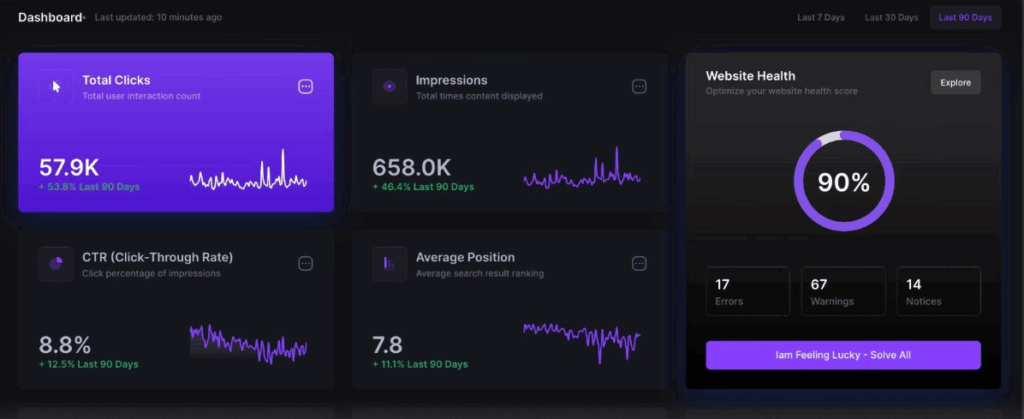
4. CTR Analytics Dashboard
The dashboard is clear, simple, and focused. You’ll see:
- Pages with high impressions but low CTR
- Test results and which version performed best
- Your overall CTR trends over time
Everything is visual. You don’t have to be an SEO nerd to understand it.
5. Platform Integrations
Clickrank connects with tools like:
- Google Search Console
- Google Analytics
- WordPress
- Shopify
- WooCommerce
It pulls data automatically and can even help you publish title updates without jumping between tabs.
Why Clickrank Is a Quiet Win for Content Teams and Solopreneurs Alike
We talk a lot about content strategy, keyword research, and backlinks. But most of us forget that the title is the only part of our content people see before they click.
Clickrank gives you the chance to improve that one critical piece.
And if you’re managing multiple pages or clients, it’s even more useful. You can scale testing across dozens of posts, product pages, or landing pages — and finally stop wondering which headline works best.
Real Use Cases That Show It Works
✅ Case Study 1: A Blog Post Goes from 2.1% to 4.4% CTR
A SaaS company had a blog post ranking in position #4 for a high-traffic keyword. It was getting impressions, but not many clicks.
After running two headline tests with Clickrank, they found a version that doubled the click-through rate. That one change brought in 600 more clicks per month — without touching the content or the ranking.
✅ Case Study 2: E-Commerce Titles That Sell
A small online shop selling pet products tested new product titles using Clickrank. They ran a test for “Durable Dog Leash” vs. “Heavy-Duty Dog Leash for Large Dogs – Free Shipping.”
The second title not only brought in more clicks, but also improved conversion rate because it set better expectations. Total sales for the product page went up by 17% in six weeks.
✅ Case Study 3: An Agency’s Secret Weapon
A content marketing agency started using Clickrank to improve CTR across client pages that were already ranking but underperforming. After three months, their clients reported a combined 18% increase in organic traffic — no new content, no new backlinks, just better optimization.
Pros and Cons of Clickrank
✅ Pros
- Simple, clean interface
- Makes title and meta writing way easier
- The A/B testing feature is incredibly useful
- You get clear, visual results
- Doesn’t require deep SEO knowledge to get results
❌ Cons
- Doesn’t do keyword research or backlink tracking — it’s a focused tool
- Best suited for pages with existing impressions (low-traffic pages won’t test as quickly)
- Monthly pricing might not suit every beginner, though ROI is generally solid
Is Clickrank Right for You?
Here’s who will benefit the most from Clickrank:
- Bloggers and writers with posts already ranking
- SEO specialists looking for measurable CTR improvements
- E-commerce stores that want better product page performance
- Agencies that want to scale on-page optimization without reinventing the wheel
If you’re in the early stages of building your site or don’t yet have impressions coming in, it may be too early. But once you’re getting traffic — even a little — Clickrank becomes incredibly useful.
FAQs About Clickrank
Is Clickrank hard to use?
Not at all. It’s made for writers, marketers, and store owners — not developers. Everything is intuitive.
How much traffic do I need to run A/B tests?
Ideally, your pages should be getting at least 100 impressions a week. The more traffic you have, the faster you’ll see results.
Can I use Clickrank for product pages and landing pages?
Absolutely. In fact, it works especially well for them because product headlines often get overlooked.
Does it support international websites?
Yes, Clickrank supports multiple languages and character sets. It works well for multilingual or region-specific pages.
Can I use it with my team?
Yes, you can invite teammates, assign tests, and share dashboards. It’s built for collaboration.
Final Thoughts: It’s Not About Writing More. It’s About Getting More From What You’ve Already Written
Clickrank doesn’t give you flashy features you won’t use. It gives you a smarter way to get more traffic from the content you already have.
That’s the beauty of it. No need to write another blog post. No need to chase more backlinks. Just make the link you already have more clickable — and watch your traffic grow.
If your pages are showing up but no one’s clicking, don’t waste that opportunity. Clickrank helps you turn visibility into actual visitors, and that’s what SEO is all about.