👋 Hey There – Let Me Tell You a Story…
If you’ve ever run a small business — a cafe, a clinic, or even a retail store — then you know how messy scheduling can get. I’ve been there. Trying to coordinate shifts with my team using WhatsApp, Google Calendar, and those color-coded Excel sheets was driving me nuts.
Then I found Camelo — and no, this isn’t one of those cheesy “change your life” pitches, but this app really did take a huge weight off my shoulders.
In this post, I’m sharing everything I’ve learned using Camelo over the last month — what it does well, where it struggles, and whether it’s worth your time (and money).
🧠 What Is Camelo?
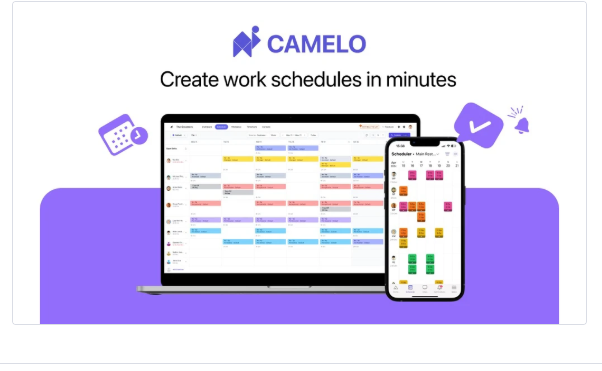
Put simply, Camelo is a scheduling and staff management app designed for small businesses. You can create work shifts, assign them to team members, track hours, and chat — all in one place.
It’s kind of like if Google Calendar, a time clock, and a group chat had a baby — but easier to use and way more focused on real-world scheduling needs.
Who’s it for?
- Cafés & restaurants
- Barbershops and salons
- Clinics and small medical practices
- Retail stores
- Teams with rotating or part-time staff
🚀 What Makes Camelo Stand Out?
Let’s talk about what makes this app worth talking about. These aren’t just bullet points from a brochure — these are things I actually found useful.
1. 🗓️ Making & Sharing Schedules Is (Finally) Easy
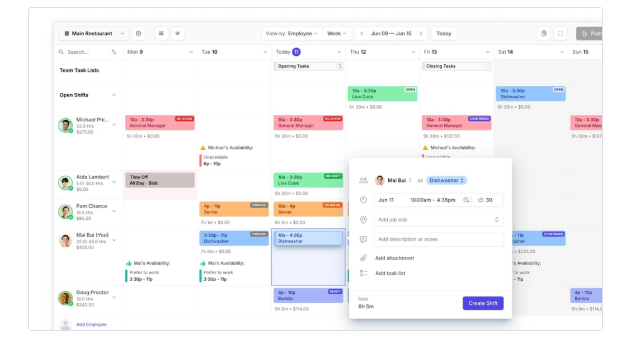
With Camelo, I just tap and drag to create a shift, pick which team member it belongs to, and boom — they get notified instantly. No more “Did you see the message?” or “I thought I wasn’t on today.”
2. 🔁 Shift Swaps Don’t Cause Drama
Team members can request to swap or drop shifts right in the app. I get a notification, approve it, and it’s done. No more complicated back-and-forth or someone forgetting to show up.
3. 📲 Everything in One App
Camelo includes messaging, scheduling, and time tracking all in one place. It’s clean, lightweight, and super mobile-friendly. My team loves that they don’t need five apps to stay in the loop.
4. 🕒 Track Who’s Showing Up (And Who’s Not)
Employees can check in and out using the app. I get attendance reports without asking anyone to fill out timesheets.
5. 📊 Reports That Actually Help
Camelo keeps a record of hours worked, missed shifts, late arrivals, etc. It makes payroll day so much easier, and I don’t have to guess who worked how many hours.
🔧 A Look Under the Hood (Technical Stuff)
| Feature | What You Get |
| Platforms | iOS, Android, and web browser |
| Integrations | Calendar sync, CSV reports |
| Language | English (more on the way) |
| Security | GDPR-compliant, encrypted |
| Best For | Teams of 3–50 people |
| Support | Email and help center support |
Nothing too fancy — just clean, well-built software.
👍 What I Liked (Pros)
✅ It’s made for real people, not just tech experts
✅ The mobile app is smooth, no lags or bugs so far
✅ My team actually uses it without complaining
✅ Notifications are fast and reliable
✅ Pricing is affordable — great for small teams
✅ Clean design with no learning curve
👎 What Could Be Better (Cons)
❌ Would love more integrations (like payroll software)
❌ No desktop app — web and mobile only
❌ You still need to manually enter pay rates for payroll
❌ Some reports need to be exported to see full data
❌ No offline mode (needs internet)
Honestly though, none of these were dealbreakers for me.
💵 What Does Camelo Cost?
Camelo offers two options: Free and Premium.
Free Plan
- Great for trying it out
- Up to 10 users
- Basic scheduling tools
Premium Plan – Starts at $1.20 per user/month
- Shift swaps
- Time tracking
- Messaging
- Reports and analytics
- Priority support
There’s a 14-day free trial of the Premium plan — no credit card needed.
💡 If you’ve got a team of 5–20 people, this is probably one of the cheapest ways to automate scheduling without stress.
🧑🍳 Real Example: How I Use Camelo in My Coffee Shop
I help manage a small café with 8 employees — baristas, kitchen staff, and part-time servers. Every week used to be chaos: people forgetting shifts, mixing up times, and asking me a dozen questions over WhatsApp.
With Camelo, I do this:
- Spend 20 minutes making the full weekly schedule
- Assign each shift to staff with a tap
- Employees check the app, confirm, and show up
- If someone wants to swap, I get a ping and approve it
That’s it. No more drama, no more mistakes, and way less time spent on admin.
👂 What Other People Are Saying
“This app has literally saved me hours every week. I wish I had found it sooner.”
– Jenna, Spa Owner
“The interface is so clean. My staff actually like using it — that’s saying something.”
– Mike, Retail Store Manager
“I use Camelo for my cleaning crew. Everyone gets their schedule, and I get reports at the end of the week. Simple and solid.”
– Ali, Cleaning Business Owner
📌 Quick Comparison: Camelo vs. Old-School Scheduling
| Feature | Camelo | Google Sheets | |
| Easy scheduling | ✅ | ❌ | ❌ |
| Real-time updates | ✅ | ❌ | ❌ |
| Shift swaps | ✅ | ❌ | ❌ |
| Attendance tracking | ✅ | ❌ | ❌ |
| Team messaging | ✅ | ❌ | ✅ |
| Reports & timesheets | ✅ | ❌ | ❌ |
🧾 Final Verdict: Should You Use Camelo?
If you’re managing a team — and you’re tired of texting schedules, chasing down confirmations, or fixing shift mix-ups — Camelo is 100% worth trying.
It’s not bloated with features you’ll never use. It does one thing really well: scheduling and managing small teams.
- It saves time
- Reduces mistakes
- Keeps your team happy
- And honestly, makes you look more professional as a manager
Rating: ★★★★☆ 4.8/5
👉 Try Camelo Today (No Credit Card Needed)
Whether you’re running a coffee shop, a clinic, or a mobile team — Camelo helps you keep everything running smoothly.
🔗 [Start your free trial here]