Let’s be honest — every year a new “game-changing productivity tool” pops up and promises to revolutionize how we work. Most of them? Overhyped. Some are clunky. A few are decent. Rarely do they truly deliver.
So when I first came across MagicX, I was skeptical. Another automation tool? With AI? Great. Just what the world needs, right?
But after using it for over a month with my remote team — automating everything from daily check-ins to client onboarding — I have to admit: MagicX actually lives up to the hype.
In this post, I’ll break down my real experience using MagicX, what works, what doesn’t, and whether it’s worth adding to your workflow stack in 2025.
So, What is MagicX — Really?
At its core, MagicX is a smart workflow automation platform. But that barely scratches the surface.
It’s a tool that lets you connect your favorite apps, build custom automations (without coding), and streamline repetitive tasks. Think of it as Zapier meets Notion, with a cleaner UI and actual intelligence built in.
MagicX learns your patterns. If it notices that you’re always creating a Trello card after a Slack message or uploading a file to Drive after every Zoom call — it’ll suggest automations for you. That part feels… well, magical.
My First Impressions
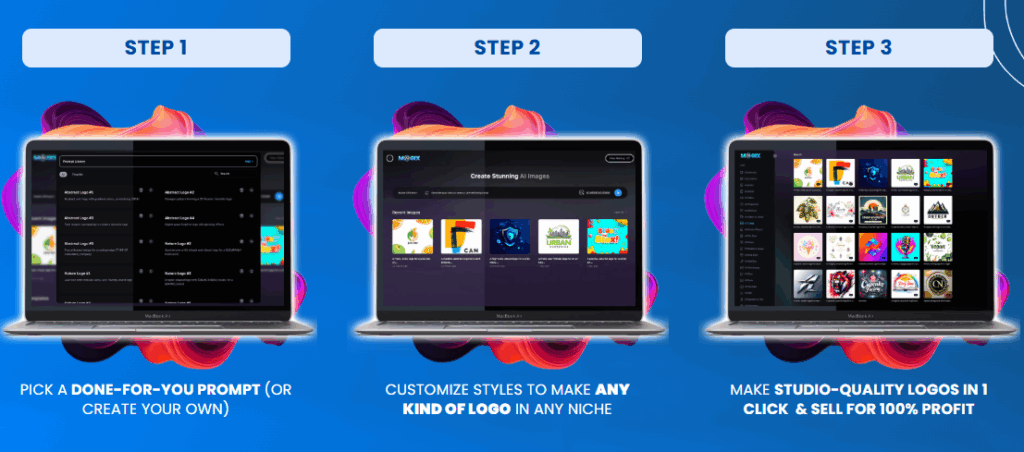
I signed up for the free plan and was greeted by a simple, distraction-free dashboard. It didn’t take long to get the hang of it. Within the first 30 minutes, I had:
- Connected my Google Calendar, Gmail, Trello, and Slack
- Built an automation to remind my editor every Monday morning to check the week’s blog queue
- Set up a workflow that auto-saves any email attachments to a shared Google Drive folder
The drag-and-drop builder is intuitive. If you’ve ever played with Lego blocks, you can build automations here.

Real Use Cases (From My Team)
Over the weeks, I’ve used MagicX in several real scenarios — here are a few highlights:
📦 Client Onboarding for My Agency
Every time a new client signs a contract, MagicX:
- Sends a welcome email
- Shares our onboarding Notion doc
- Creates a folder in Google Drive
- Adds a task in Trello for kick-off
All of that used to take me 15–20 minutes per client. Now it’s one click. Time saved? Immeasurable.
🧑💻 Freelancer Automation: Time Tracking and Invoicing
My friend, a freelance video editor, uses MagicX to:
- Log hours automatically from his calendar events
- Send a weekly invoice draft to clients every Friday
He doesn’t even open his invoice tool anymore. It’s just… done. That’s next-level automation for solo workers.
👩💼 HR Team Offboarding Flow
A client’s HR department uses MagicX to handle employee exits:
- It revokes tool access
- Triggers a checklist
- Schedules the exit interview
- Archives documents
No delays, no human errors, no awkward “oops, forgot to remove their email access.” It’s handled automatically.
Let’s Talk Features (What Makes It Tick)
MagicX isn’t bloated. It’s got just the right amount of muscle. Here’s what stood out:
🧠 AI Workflow Suggestions
This is the smartest part of MagicX. It doesn’t just wait for you to build stuff. It recommends workflows based on your habits. I got suggestions like “auto-send meeting summaries to your team” or “set a daily focus reminder.”
🔧 Drag-and-Drop Builder
No dev skills required. The interface is clean, visual, and easy to follow. Triggers → Conditions → Actions. That’s it.
🔌 200+ App Integrations
I integrated Slack, Google Workspace, Notion, Zoom, and Airtable without any weird errors or workarounds.
🧱 Templates Gallery
Don’t want to build from scratch? MagicX has a bunch of ready-made automation templates. You can tweak them in seconds.
🔐 End-to-End Encryption
Data is secure, GDPR-compliant, and two-factor enabled. That’s huge for clients who care about privacy.
📱 Mobile Friendly
I’ve built and edited workflows right from my phone on the train. That flexibility is rare.
Pros and Cons (No Fluff)
✅ What I Loved
- Actually useful AI: Not just a gimmick — it genuinely helps
- No-code builder: Non-tech users can build powerful automations
- Intuitive interface: Simple, clean, modern
- Time-saving templates: Great for people who don’t want to tinker
- Flexible pricing: Free plan works surprisingly well
❌ What Needs Work
- Advanced logic can be overwhelming: Once you get deep, it’s a bit complex
- Mobile UI: Functional, but not as smooth as desktop
- No offline mode: Must be online to use (not a dealbreaker, but worth noting)
- Slight learning curve: Took me a week to feel “fluent”
Pricing Breakdown (Worth It?)
MagicX isn’t expensive, but it isn’t “dirt cheap” either — and that’s okay. You get what you pay for.
- Free – Good for basic tasks and 100 automation runs/month
- Pro ($19/month) – Unlimited workflows, better support, 1,000 runs/month
- Team ($49/user/month) – Shared workflows, real-time analytics, permissions
- Enterprise – Custom plans, SSO, onboarding help
📝 Pro Tip: Try the free version for a few days. If it clicks, upgrade. I started free and switched to Pro within a week.
Is MagicX Better Than Zapier or Make?
Honestly? For non-developers and teams: Yes.
Here’s why:
| Feature | MagicX | Zapier | Make |
|---|---|---|---|
| AI Recommendations | ✅ | ❌ | ❌ |
| UI Simplicity | ✅ | Okay | ❌ Complex |
| Collaboration Tools | ✅ | Limited | ❌ |
| Free Plan Usefulness | 👍 | So-so | Meh |
| Best For | Teams & Freelancers | Devs & Techies | Advanced Users |
If you need ultra-custom logic and scripts, Zapier or Make may still be better. But for 90% of users, MagicX wins on usability and speed.
FAQs (Quick Answers)
Q1: Can I use MagicX without any tech skills?
Absolutely. I’m not a developer, and I was building workflows within an hour.
Q2: Is the free plan worth trying?
Yes. It’s not just a demo — it’s functional enough to test real workflows.
Q3: Will it replace my project management tool?
Not exactly. But it will enhance whatever you’re using — Trello, Asana, Notion — by automating tasks around it.
Q4: How secure is it?
Very. They use encryption, follow GDPR rules, and let you control user permissions.
Q5: Does it slow down with lots of automations?
No lag so far — and I’ve tested over 30 workflows.
Final Thoughts: Is MagicX Worth It in 2025?
Yes. 100%.
MagicX isn’t perfect — no tool is — but it’s easily one of the most helpful, genuinely smart productivity platforms I’ve tested in years.
It doesn’t just automate. It simplifies. It learns. It nudges you toward better habits.
If you’re tired of wasting time on stuff that could be done for you, MagicX will feel like hiring a virtual assistant who actually knows what they’re doing.