Let’s Be Real: Google Sheets Is Powerful, But Not Friendly
We’ve all been there.
You’re staring at a Google Sheet filled with data — and you know there has to be a smarter way to get your job done. But unless you’re a spreadsheet wizard or know how to code, you’re stuck clicking through menus, copying and pasting data, or—let’s be honest—just giving up.
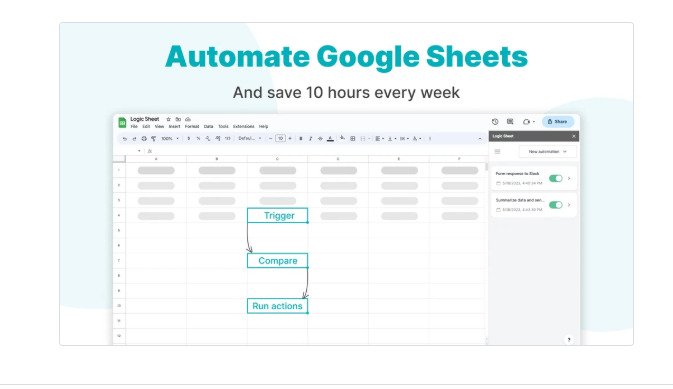
Enter Logic Sheet — the automation tool that makes Google Sheets smarter, faster, and actually fun to use.
And the best part? You don’t need to know how to code. At all.
🧠 What Is Logic Sheet, in Simple Words?
Logic Sheet is like having a personal assistant built into Google Sheets. It helps you automate tasks, connect to external APIs, scrape data from websites, and even build workflows — all without writing a single line of code.
It’s built for people like you and me:
- Freelancers managing projects
- E-commerce sellers updating prices
- Marketers pulling SEO or ad data
- Teachers organizing student responses
- Startup founders tracking leads or metrics
If you’ve ever wished your spreadsheets could just do more — this tool was built for you.
🛠️ My Honest Experience Using Logic Sheet
When I first tried Logic Sheet, I wasn’t expecting much. I figured it would be “just another Google Sheets plugin.”
But within 15 minutes, I had:
✅ Connected to a public API
✅ Pulled product pricing data
✅ Filtered the output into a clean format
✅ Set it to update automatically
I didn’t have to install any other tool. Everything ran right inside my spreadsheet. It was smooth, clean, and kind of addictive.
✨ Key Features That Actually Matter
Let’s skip the buzzwords and talk about what Logic Sheet actually does well—from the perspective of someone who used it hands-on.
🔗 1. Connect to Any API (Yes, Even If You’re Not a Developer)
This feature alone is worth the price. You can connect to any public API—and Logic Sheet helps you structure the request even if you have no idea what a “GET method” is.
Example: I pulled in cryptocurrency data from CoinGecko into my sheet in minutes. No scripting. Just fill in the fields and click “Run.”
🌐 2. Web Scraper Built In (Because Copy-Pasting Is So 2020)
Need to pull data from a website? Just enter the URL and let Logic Sheet grab the info for you.
- Works great for price tracking
- Pulls data into clean columns
- Handles page structure like a champ
I used this to track product pricing from 3 competitors — and saved hours of manual checking every week.
📁 3. Smart Folder-Like Automation (Based on Conditions)
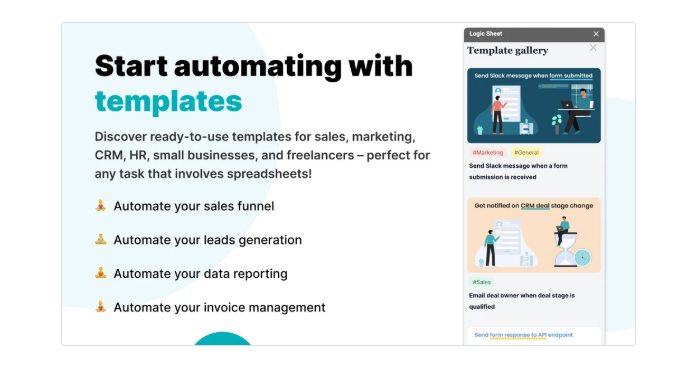
You can set rules based on what’s inside your sheet. It’s like Zapier-lite, but built into Google Sheets.
For example:
- If the “Status” column says “Closed,” auto-highlight the row
- If a price drops below a certain number, trigger an alert
- If a form entry contains “VIP,” move it to a priority tab
Seriously useful stuff.
📄 4. Google Forms + Logic Sheet = Automated Magic
I tested this with a form I use to collect leads. Logic Sheet filtered the answers by location, tagged them with a sales rep name, and sent out intro emails — automatically.
Perfect for:
- Teachers
- Coaches
- Event organizers
- Lead gen
It turns Forms + Sheets into a real automation system.
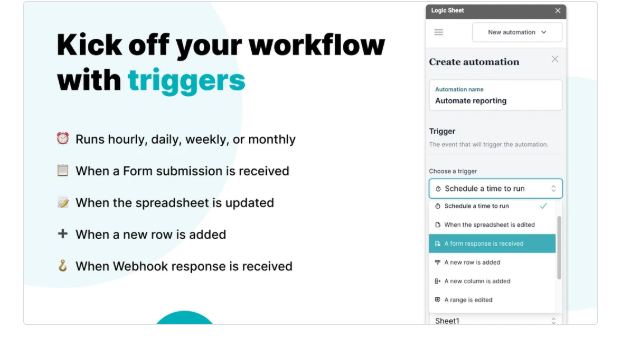
💡 5. New in 2025: Visual Workflow Builder
This new feature is 🔥.
You get a drag-and-drop workflow tool to chain multiple steps together. So now you can do things like:
- Pull API data
- Filter it
- Format it
- Email it
- All in one visual flow.
And it works. No lag, no errors, just smooth.
🙋 Who Is Logic Sheet For?
Let’s be real. Not everyone needs automation. But if any of these sound like you, Logic Sheet will probably save you a ton of time.
🧑💻 Freelancers & Solo Creators
Keep track of projects, clients, content calendars, or invoices. Add automation that saves you 1–2 hours a day.
🛍 E-commerce Owners
Automatically update prices, track competitor pricing, manage inventory or pull reports from Shopify or WooCommerce via APIs.
🧑🎓 Teachers & Coaches
Sort and tag form responses, send automatic follow-up emails, or manage student progress without opening another tool.
🧑💼 Teams & Startups
Track leads, send reports, update project status, and trigger Slack messages based on sheet content.
✅ Pros and Cons (From My Perspective)
Let’s get honest. Here’s what I love — and what I wish was better.
👍 Pros:
- Extremely beginner-friendly
- No coding needed, even for complex logic
- Works inside Google Sheets (no extra dashboards)
- API and scraper tools are game changers
- Affordable, even on Pro
- Support and tutorials are actually helpful
👎 Cons:
- Slight learning curve if you’ve never used APIs
- No mobile app — though mobile web works okay
- Scraping fails sometimes if sites change structure
- You need internet — doesn’t run offline
💵 Logic Sheet Pricing (As of 2025)
Here’s what it costs:
| Plan | Best For | Price |
|---|---|---|
| Free | Testing + light use | $0/month |
| Pro | Full features, solo | $9/month |
| Team | Collaboration tools | $29/month |
| Enterprise | Big businesses | Custom pricing |
Tip: You don’t need the paid plan until you hit heavy automation. But when you do, it’s worth every penny.
🔎 SEO Keywords Used in This Post
Naturally used throughout the blog:
- Logic Sheet review
- Google Sheets automation tool
- Best no-code spreadsheet tool
- API connector for Google Sheets
- Automate Google Forms responses
- Web scraping with Sheets
- Spreadsheet workflow builder
🙌 Final Thoughts: Is Logic Sheet Worth It?
If you’re using Google Sheets more than once a week — yes, Logic Sheet is worth it.
It’s like giving superpowers to your spreadsheet. You’ll:
✅ Save time
✅ Avoid mistakes
✅ Impress your boss or clients
✅ Actually enjoy using Google Sheets again
And since there’s a free version, there’s no reason not to try it.
🔗 Ready to Try It? Let’s Go
🎯 Start Free and Automate Smarter
👉 Try Logic Sheet Free Now
🚀 Unlock Pro Power for $9/month
👉 Upgrade to Logic Sheet Pro
You’ll wonder how you ever lived without it.